

Benchmark Study
This page is the benchmark dossier forgitquarry search. It is not just a run log. The goal is to answer the product questions that matter in practice:
- how much latency each option adds
- what that extra cost actually buys
- which modes preserve the native baseline versus deliberately breaking away from it
- when optional knobs such as README enrichment, weighted blends, recency, and language filters are worth using
api gatewayterminal ui
api gateway is noisy and infra-heavy. terminal ui is lexically cleaner and exposes whether a mode is adding useful semantic breadth or just drifting.
Executive Summary
- Native is still the only sub-second path. In this run it stayed around
~0.5sto~1.1s. - Quick discover adds
~15.7sto~18.3sover native. - Balanced discover adds
~26.8sto~30.1sover native. - Deep discover adds
~52.5sto~59.8sover native. - README enrichment added another
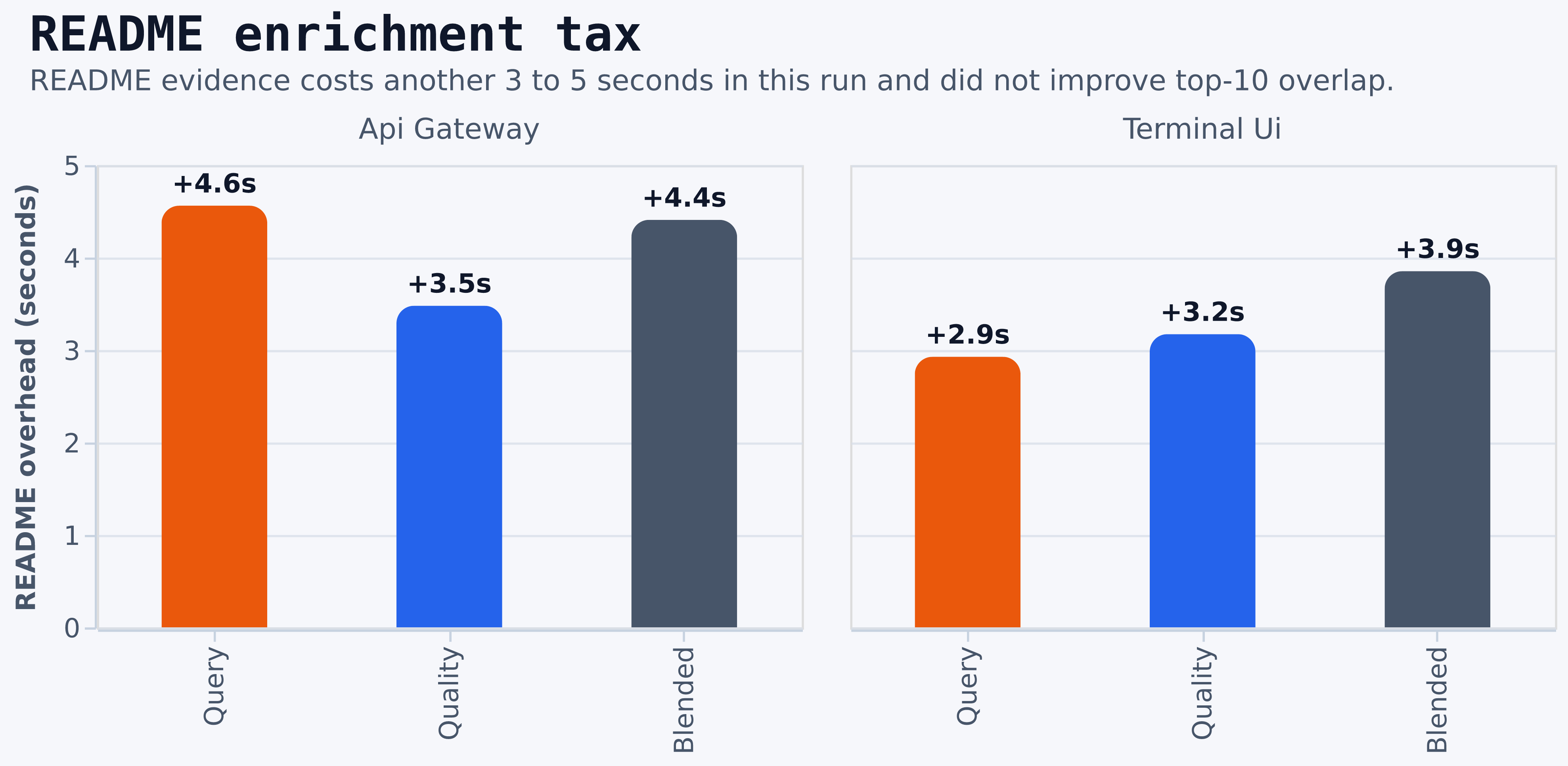
~2.9sto~4.6son top of balanced discover and did not improve top-10 Jaccard overlap in either benchmark query. - For baseline preservation,
qualityis the best default non-native rank mode. - For
api gateway, the strongest upgrade from native wasdiscover-balanced-blended-quality-heavy. - For
terminal ui, the strongest upgrade from native wasdiscover-balanced-quality. - For maximum semantic expansion,
querystill introduces the most novelty, but it sheds much more of the native core.
Recommendation Matrix
Cost Ladder
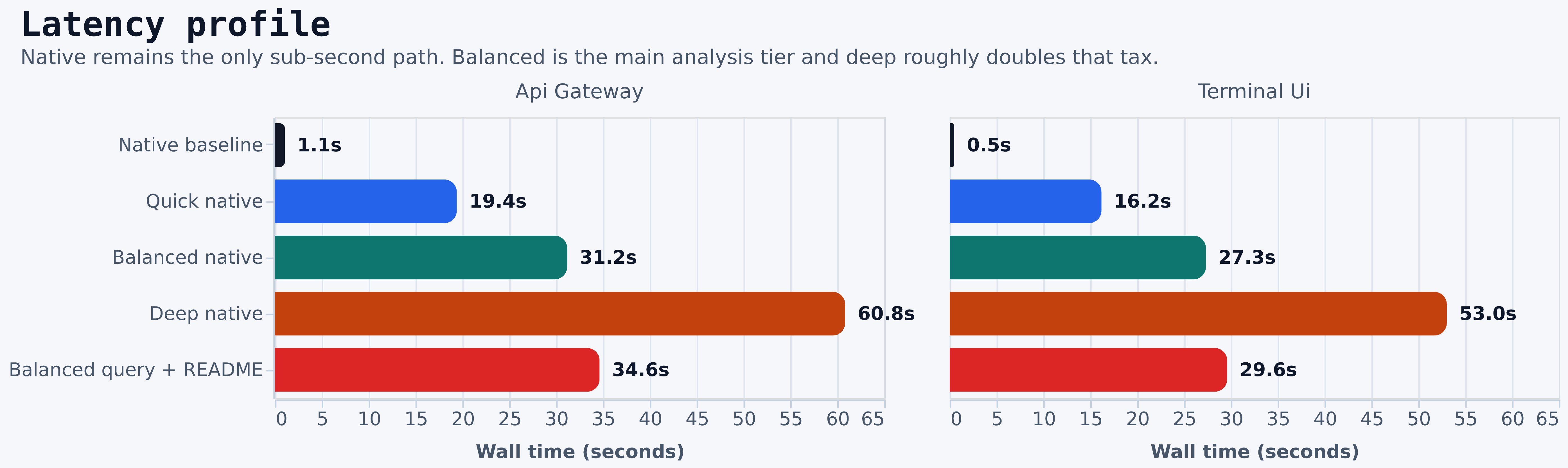
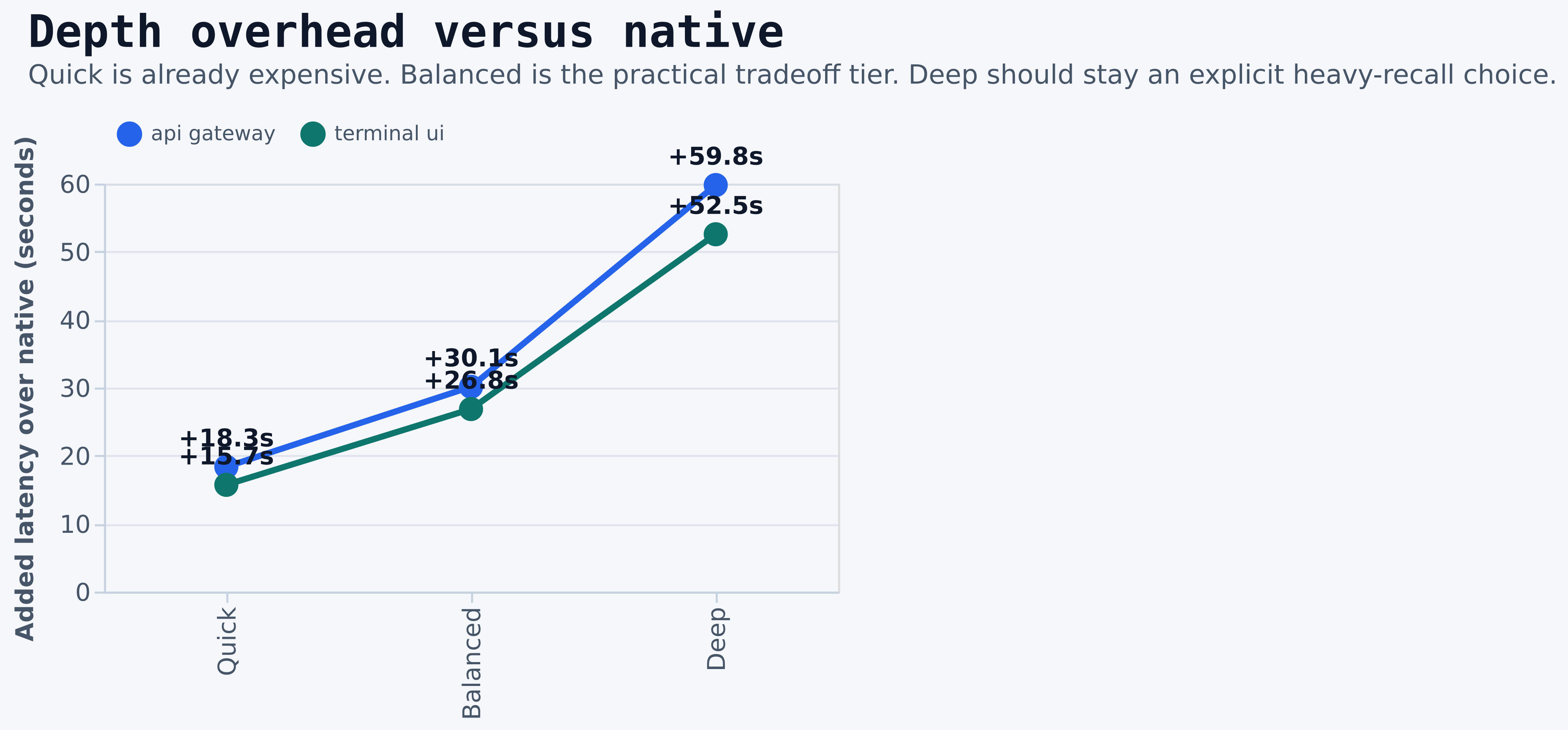
- Native is the only low-latency mode.
- Quick discover is already a substantial tax. Treat it as a deliberate opt-in, not a near-native fallback.
- Balanced discover is the practical analysis tier. It is slow enough to matter, but still much cheaper than deep.
- Deep discover is expensive enough that it should be reserved for deliberate heavy-recall workflows.
- README enrichment is not free. In this study it added
~11%to~15%on top of balanced discover while leaving top-10 overlap unchanged.
Balanced Decision Zone
Balanced discover is where the real product tradeoffs live. It is the family most likely to be exposed as the default advanced mode, so it deserves deeper inspection than the raw run table.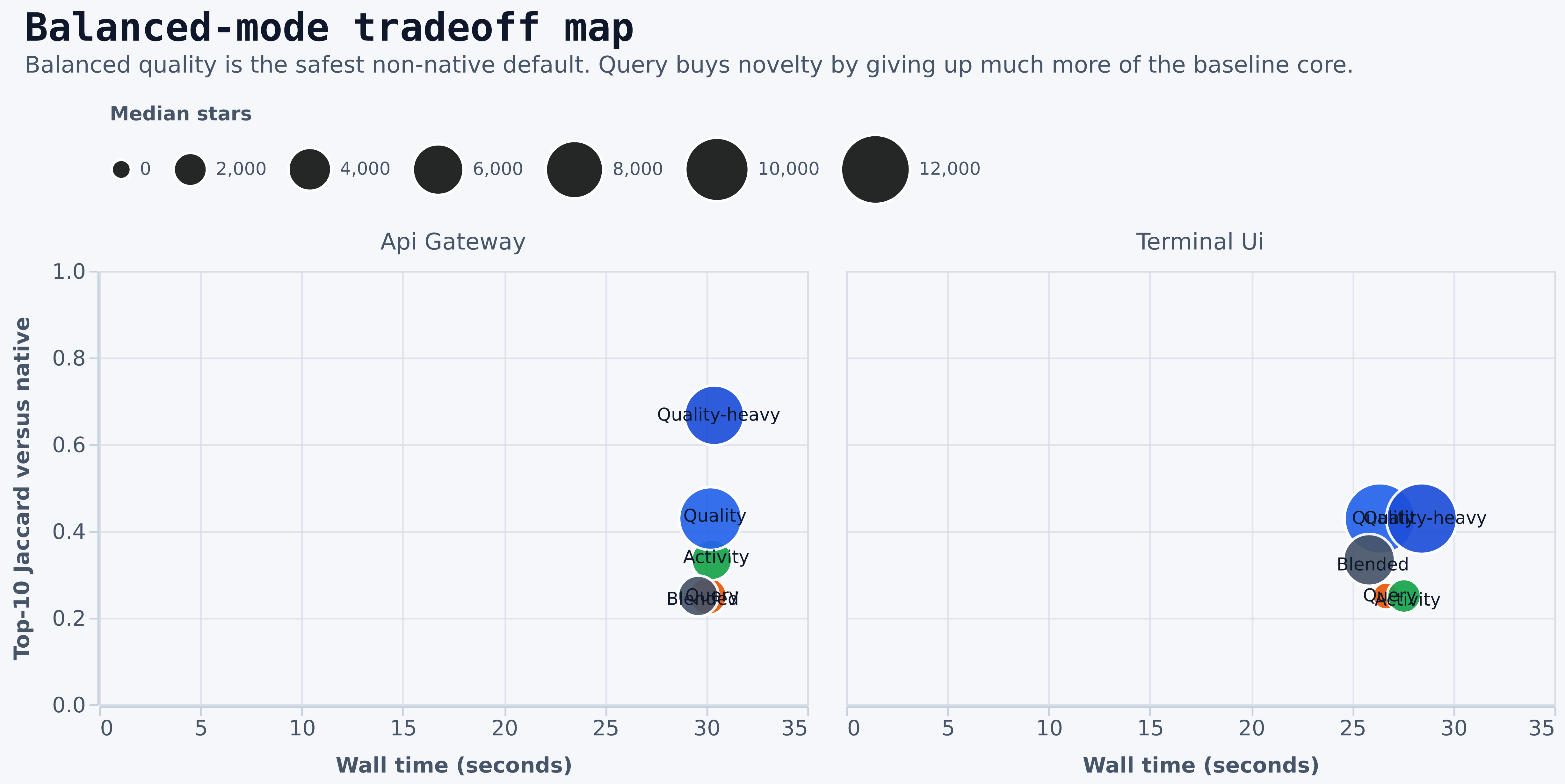
report.md, paired-effects.csv, and scenario-analysis.csv.
What these views show:
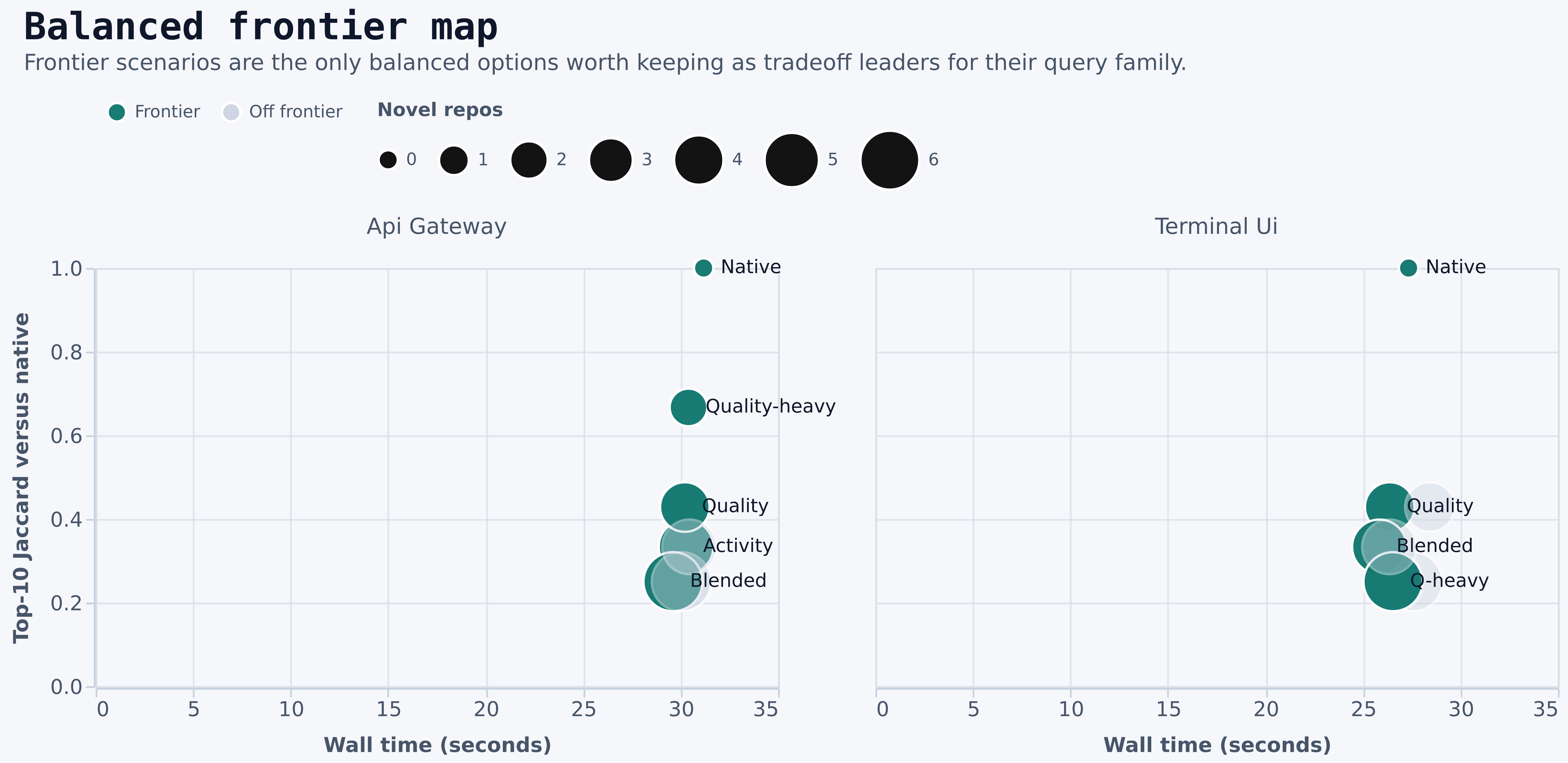
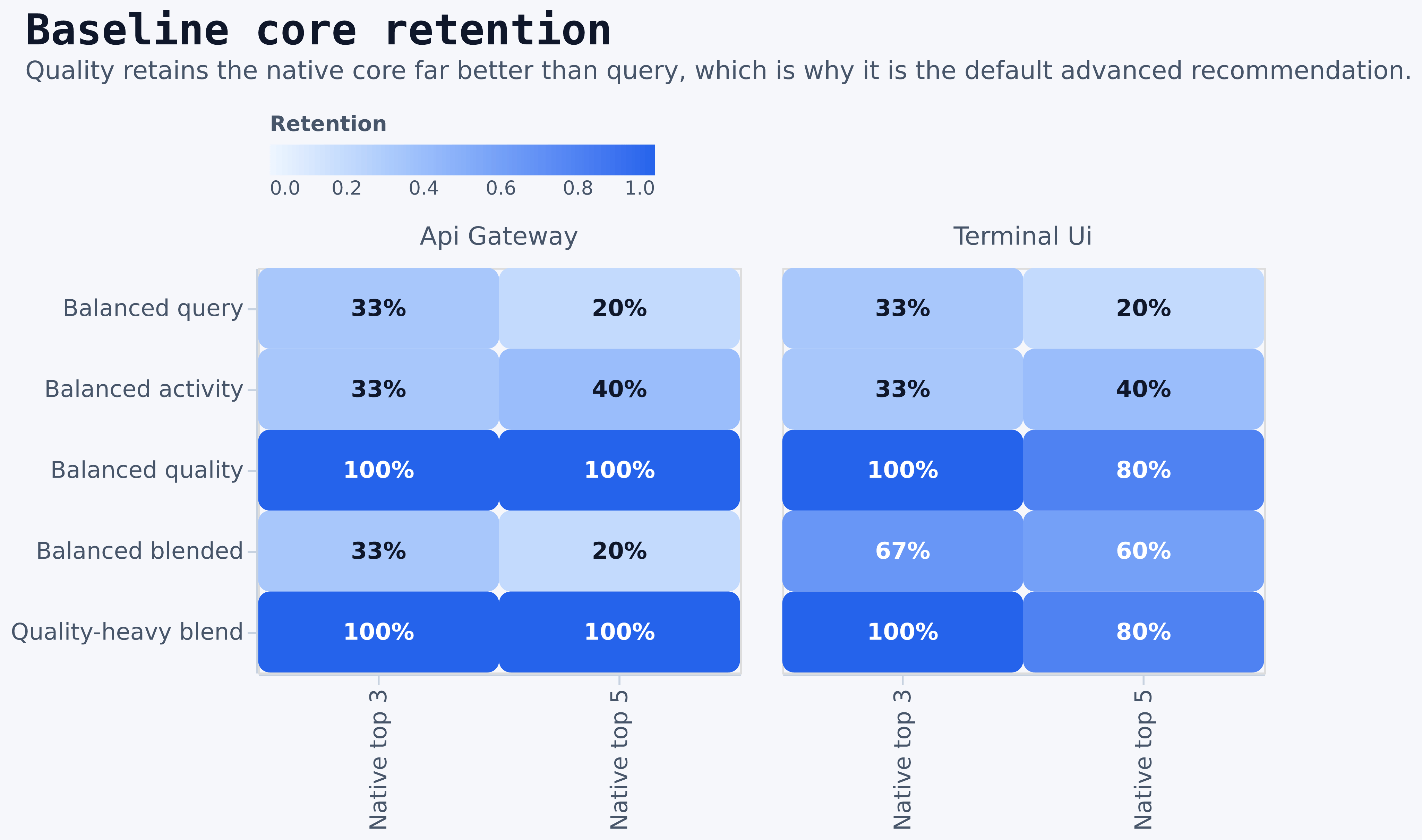
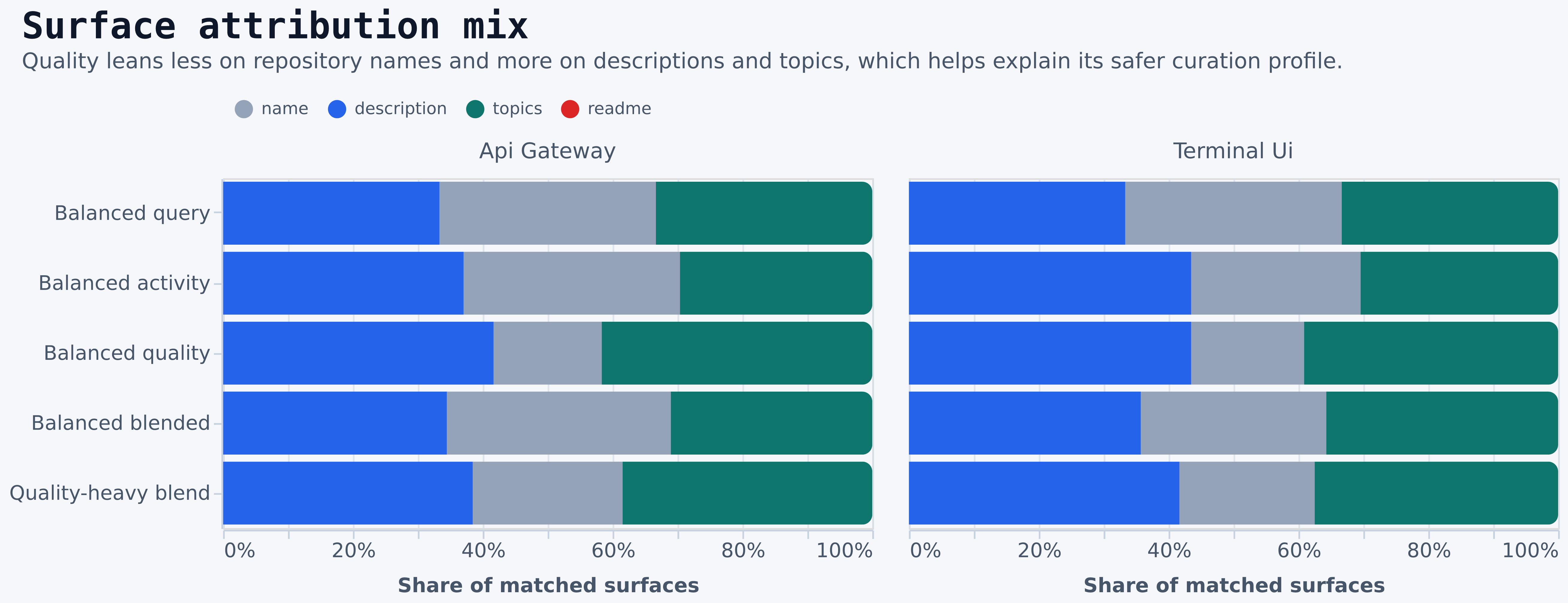
qualityandquality-heavypreserve the native core far better thanquery.blendedis often the cheapest balanced choice, but its top-10 fidelity is materially lower thanquality.queryis not the best frontier choice in this run. It is dominated by cheaper alternatives with equal or better novelty tradeoffs in key cases.quality-heavyis especially strong onapi gateway, where it preserves the native core while improving repository quality signals.- The surface-mix chart explains why:
qualityleans less on repository names and more on description and topic evidence.
- On
api gateway, the balanced frontier includesnative,activity,quality,blended, andquality-heavy. - On
terminal ui, the balanced frontier includesnative,quality,blended, andquery-heavy. discover-balanced-queryis not on the balanced frontier for either benchmark query.- README variants are off the frontier in this run because they add cost without improving top-10 fidelity.
Ranking Mode Guidance
The rank mode is the real behavior selector. Depth mostly controls cost. Rank controls what sort of repositories survive the cut.Knob Guidance
Query-Specific Findings
api gateway
discover-balanced-blended-quality-heavywas the best non-native compromise.- It kept
8/10of the native top 10 and5/5of the native top five. discover-balanced-qualityalso retained the full native top five, but with less baseline overlap thanquality-heavy.discover-balanced-queryanddiscover-balanced-blendedboth delivered6novel results, but each kept only1/5of the native top five.- README enrichment added
+3.5sto+4.6sand did not improve top-10 Jaccard.
terminal ui
discover-balanced-qualitywas the best non-native default.- It kept
4/5of the native top five with0.4286Jaccard and remained cheaper thanquality-heavy. discover-balanced-blendedsat on the frontier because it was cheaper and still delivered5novel results.discover-balanced-blended-query-heavyalso sat on the frontier and dominated plaindiscover-balanced-queryin this run.- README enrichment added
+2.9sto+3.9sand again did not improve top-10 Jaccard.
Churn And Stable Leaders
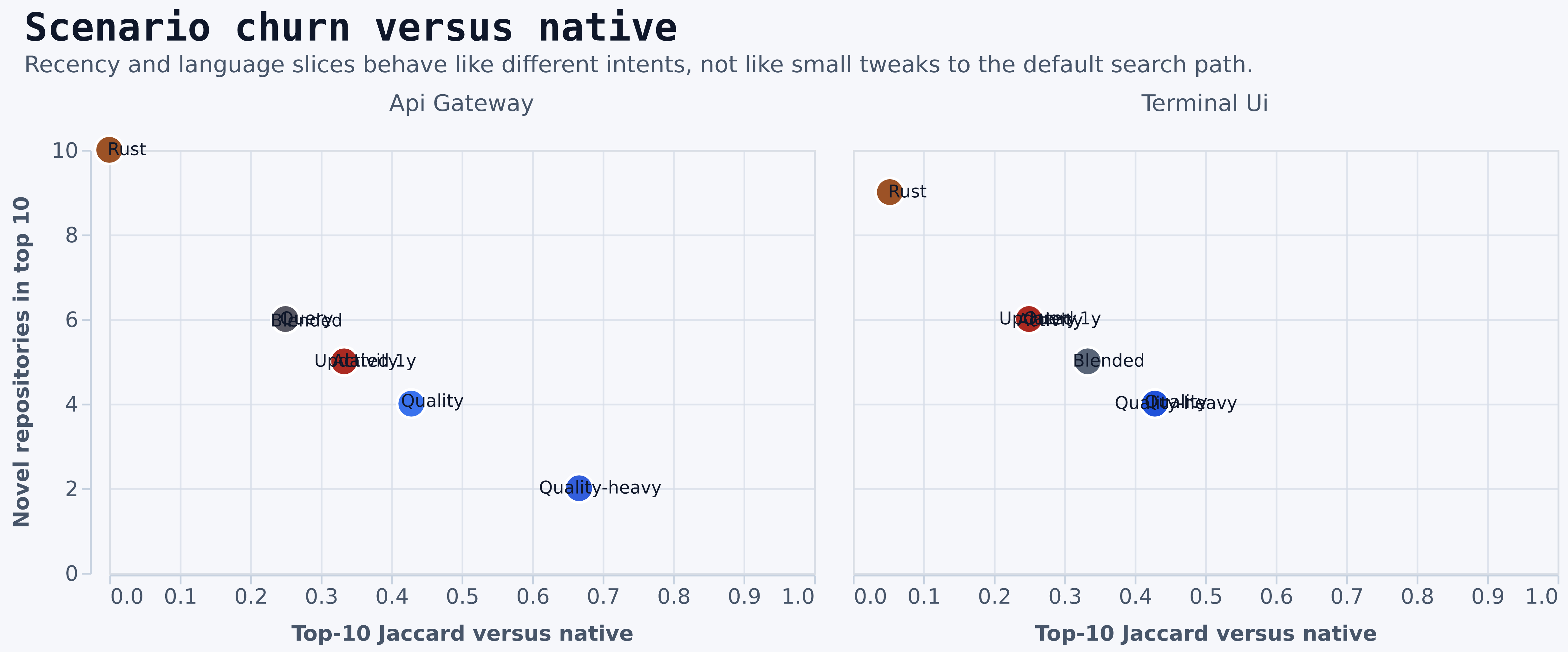
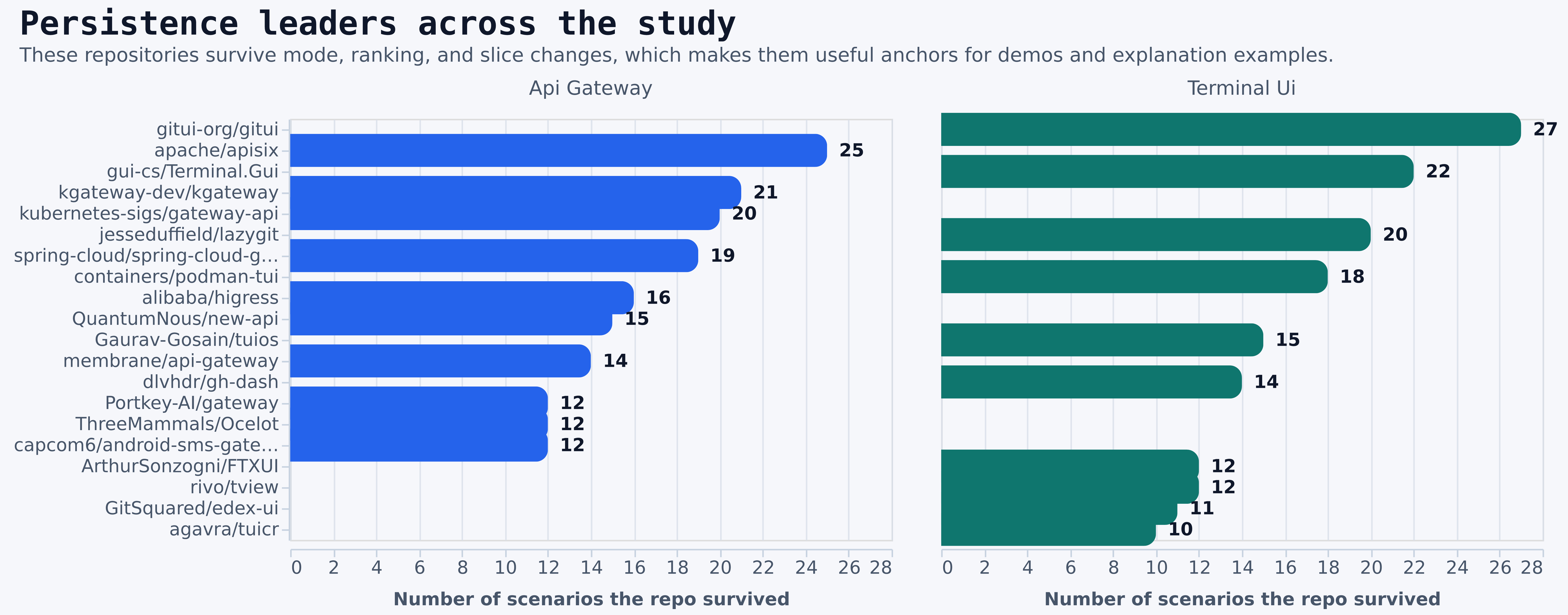
- The churn chart tells you which options are still “about the same search” versus which ones are effectively different products.
- The persistence chart shows which repositories survive almost every mode and filter change.
- Persistent leaders are especially useful for screenshots, demo flows, and explanation examples because they are less likely to disappear when the ranking strategy changes.
How To Run The Study
The benchmark harness lives at: Build the binary first if needed:GITQUARRY_TOKEN is not set, the runner will try to use GitHub CLI auth before failing.
Operator Playbook
If the goal is to help an operator choose a mode quickly, use these presets instead of re-reading the full study every time:
Default recommendation for most operators:
- Start with native if latency matters most.
- Move to balanced
qualityif you need a smarter curated set. - Move to balanced
queryonly when you explicitly want more novel repositories. - Add
--readme,--updated-within, or--languageonly when the task requires that specific constraint.
Output Files
The study writes raw and derived artifacts totarget/benchmark-study/.
Most useful outputs:
run-summaries.csvcomparisons.csvscenario-analysis.csvpaired-effects.csvbalanced-frontier.csvrepo-rows.csvreport.mdraw/<query>/<scenario>.json
docs/images/benchmark-study/ as direct Altair and Vega-Lite renders in both SVG and high-resolution PNG form. The CSV and markdown artifacts remain the exact source of truth for benchmark values.
How To Read The Data
Use the artifacts in this order:- Start with
report.mdfor the headline summary. - Use
paired-effects.csvfor the cleanest latency-tax and delta analysis. - Use
scenario-analysis.csvfor decision metrics such as core retention, surface shares, and frontier flags. - Use
repo-rows.csvwhen you need exact repository-level evidence, scores, and matched surfaces.
Confidence Limits
This is a strong directional benchmark, not a universal law.- It uses two live queries, not a full benchmark corpus.
- It is a single-run live benchmark against GitHub data that changes over time.
- Latency is affected by network and GitHub response conditions.
- The top-10 overlap metrics are decision-useful, but they do not capture every ranking-quality dimension.
- README enrichment may pay off more on other query classes even though it did not change top-10 overlap here.